
Performance Trends, Inc.
Producing Quality Computer Tools for Racers and Engine Builders since 1986

Circle Track Log Book v1.1 for Windows XP, Vista, Windows 7, Windows 8, Windows 10, Windows 11
Computer Program to Record Your Circle Track (and most any) Race Car Settings and Results for Future Reference, Analysis and Comparison
The Log Book lets you record and track most any setting or condition on your car that you can imagine. It even has a large section called "User Defined Specs" for those we didn't think of. You can save these settings, copy previous settings to new records, search records for certain settings or words for certain specs or in the comments.
 for info on our even more powerful Plus version.
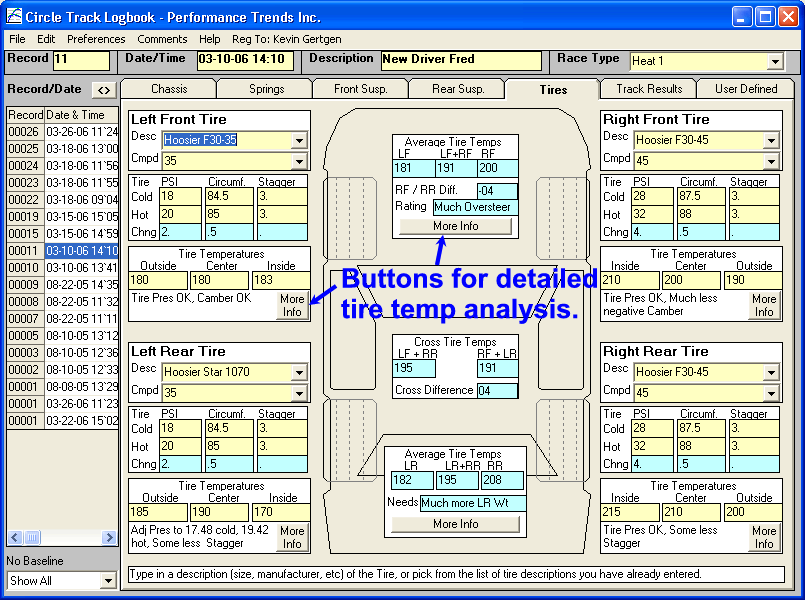
In the screen below for Tire data, you enter data into the sections highlighted in light yellow. These are the data entry fields for you to enter most any number you want. You also see light blue sections which are calculated results from your entries. For example, in this Tires screen, the program does several math operations to show differences and averages of your inputs. Light blue also shows some suggestion adjustments based on analysis of your tire temperature data. Check out our sample Tire Temperature Analysis report.
Like all our products, you will find features not found anywhere else. The screen below shows how you can link the Log Book to our suspension programs like our Circle Track Analyzer v3.6. Now you can record detailed calculated specs like Roll Center, Roll Stiffness, Caster or Camber Gain, and much more. You can go back to a particular record and see exactly what measurements you were using for that particular race session.
The program also remembers many of your part or tire names and numbers. These are then added to the list of choices for new records. This ensures that a particular shock, for example, always uses the exact name and number. This makes it much easier to search for records where you used that shock on the right front, for example.
You click on the Record List at the left side of the screen to instantly open that particular record.
You can choose a particular record to be a "Baseline" for comparison to other records. When other records are displayed, any entries which are different than the baseline are displayed in pink.
You can print just 1 section or all sections for a particular record.

The program allows for you to hide certain inputs, so you can just use the inputs you want and avoid confusion. In 'Edit Mode' shown below, you can also rename some of the inputs to something more meaningful to your race car. Click on the "movie" line at the bottom of the page to see these features.
In Edit Mode, you click on an input to get a menu of selections.
- Items which you have chosen to Hide are shown in green.
- Items which you have chosen to Rename are shown in blue. "Vent Ht" was originally called "Fender Ht" by the program.
- Items which have a "~" before their name are used in calculations or are too critical to the program and can not be changed.

When you are done Editing, the Frame Height entry above will not be shown and "Vent Ht" will be the new name of the entry shown above in blue. When in normal program operation mode, it will be shown in Black like all other entries.
Plus Version
The Plus Version adds 5 powerful features to the Log Book:
1) Lap Times features which lets you keep track of individual lap times, and do comparison analysis. You can also communicate with our Lap Segment Timer program to import those detailed lap times into this Lap Times screen.
 click image to enlarge
 click image to enlarge
for PDF on Lap Time Features.
2) You can keep records for up to 10 different cars with the 1 program.

3) You can keep detailed records on certain components which are likely to need maintenance or replacement at intervals you can specify.
for PDF on Component Details Features.
4) You can assign up to 36 User Defined entries to keep records of picture .jpg files to keep track of modifications, trophy pics, etc. for saving with each record and printing.
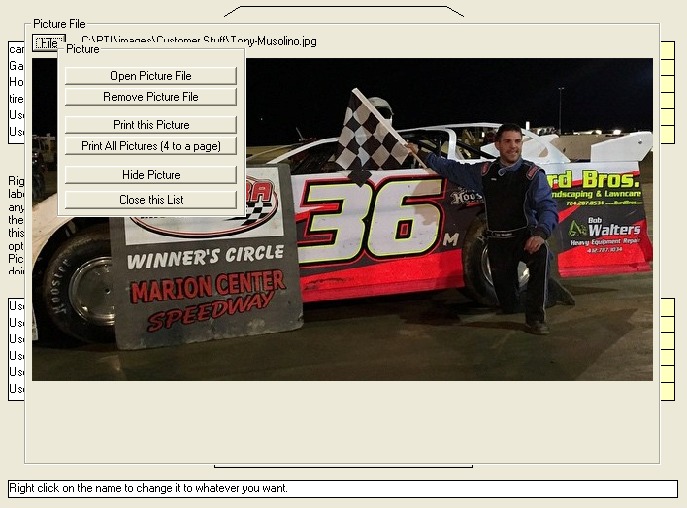 click image to enlarge it to see picture file features
 click image to enlarge it to see printout of 1 or (in this example) up to 4 pictures
per page
click image to enlarge it to see printout of 1 or (in this example) up to 4 pictures
per page
5) You can create reports of of up to 8 different data fields. You can also save these Report Formats for easily creating reports in the future. They are written to a .txt file and exported to Notepad for printing, saving, or importing into other computer programs.
 click image to enlarge it to see how User Defined labels with a "$"
are used to track expenses.
click image to enlarge it to see how User Defined labels with a "$"
are used to track expenses.
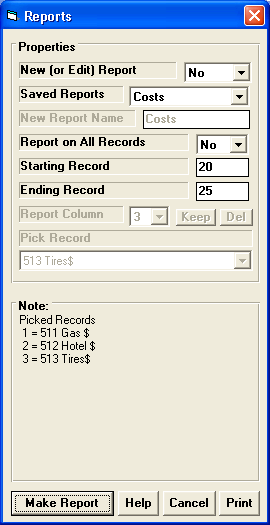 click image to enlarge it to see screen to create custom reports
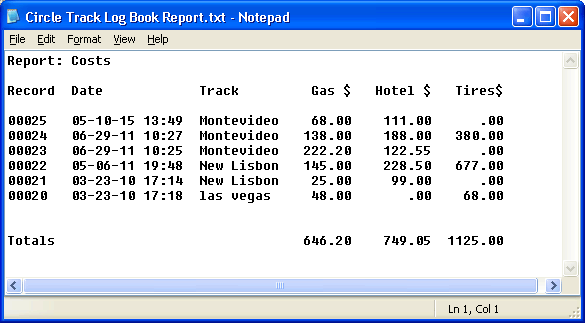 click image to enlarge it to see example of an Expense Report
 click image to enlarge it to see example of a Vehicle Weights Report
What You Need:
Computer with Windows XP, Vista, Windows 7, Windows 8, Windows 10, Windows 11.
What You Get:
Program CD with On Screen help, and links to Performance Trends' website for more info, and demo movie files demonstrating the program's main features.
More Information, Download Demo:
to
go to our Demo Downloading page to download a FREE Circle Track Log Book Demo.
More Information, Watch Demo Movies:
to
go to our Demo Movie page to watch Circle Track Log BOOK Demo Movies .
<To Order:
Our DOWNLOAD ONLY option. If you only want the unlocking code and DO NOT want a CD shipped, click on Add to Cart below. You will not be charged shipping. $149.95
If you want a CD shipped to you, click on Add to Cart below. There will be shipping charges added to your order. You can still download the demo and get your unlock code sooner with this option.
 $149.95 plus shipping
Plus Version: Our DOWNLOAD ONLY option. If you only want the unlocking code and DO NOT want a CD shipped, click on Add to Cart below. You will not be charged shipping.
$249.95
Plus Version: If you want a CD shipped to you, click on Add to Cart below. There will be shipping charges added to your order. You can still download the demo and get your unlock code sooner with this option.
$249.95 plus shipping

Call 248-473-9230. Visa or Mastercard accepted.
for Performance Trends Full Price List and ordering info.