
Performance Trends, Inc.
Producing Quality Computer Tools for Racers and Engine Builders since 1986

Drag Racing Analyzer v3.4 B for Windows XP, Vista, Win 7, Win 8, Win 10, Win 11
Computer Program to Simulate, Predict and Analyze Drag Racing Race Car Performance or 1/8 or 1/4 mile, or even Bonneville.
 to view PDF file of user manual supplement of Version 3.4 B's new
features with Adobe Acrobat (tm).
to view PDF file of user manual supplement of Version 3.4 B's new
features with Adobe Acrobat (tm).
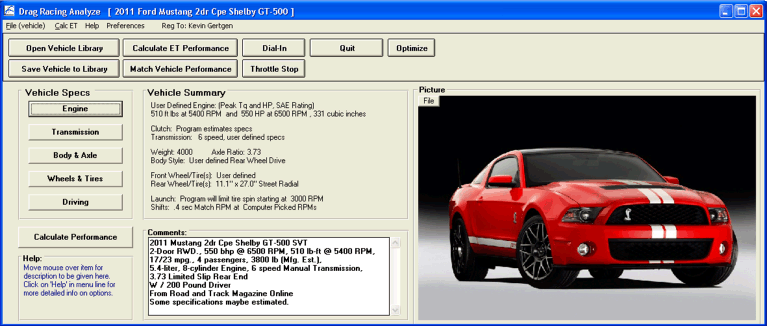
Here's the main screen of our current v3.4 B
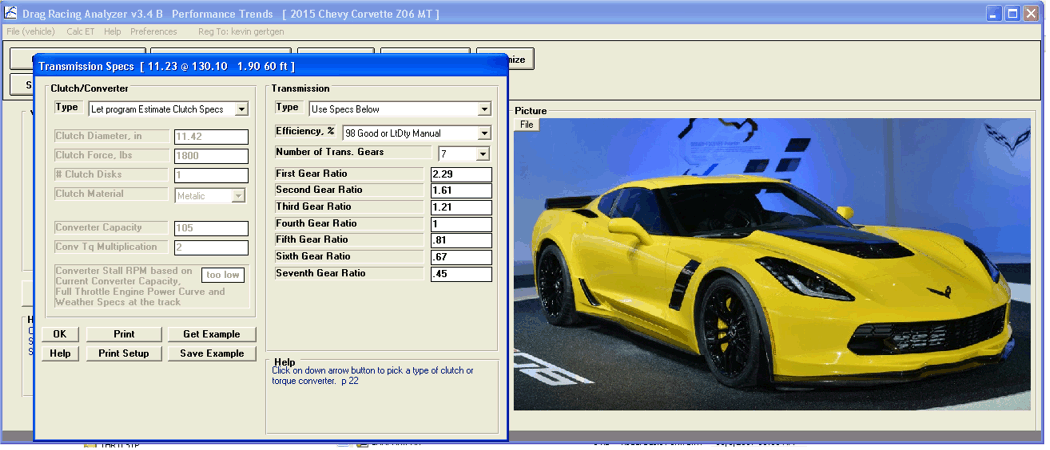
Here's Transmission Specs screen showing you can enter up to 10
transmission ratios (only 7 needed for this Z06 Vette)
Here's a screen describing some of the program's popular features:

This screen shows typical calculated results, including a small graph (which
can also be shown full screen):

The Drag Racing Analyzer is software for your personal computer to simulate a full power, standing start acceleration of most any vehicle you can design. It let's you play "what if" with engine power, weather, gear ratios, tire size, driving style, etc. and see the effect on ET, MPH, 60 ft times, tire spin, and much more. "Its like having a drag strip, dyno and chassis shop right in your computer."
Our popular DOS version got us going back in 1986. Now there's been 6 major upgrades. During this time we've learned that users keep asking for 2 things: More Ease of Use and More Features, which we've incorporated into this Windows version 3.4 B.
Ease of Use Features
-
Compatible with Windows XP/Vista/Windows 7, Windows 8 and Windows 10.
-
Lots of example engines, transmissions, body styles, torque converters preloaded for you to pick from.
-
Several ways to input engine power, from just peak HP all the way up to a full power curve of 10 RPMs. You can also generate power curves from other simple inputs, your car's actual specs and performance (MPH), or in a Windows Engine Analyzer and import it directly.
-
The Match Vehicle Performance option where you enter your car's actual stall RPM, 60 ft time, MPH, finish RPM, etc and the program adjusts critical specs to match your actual performance.
-
You can have the program automatically pick "near optimum" shift points.
-
Customize the method of entering weather conditions in up to 6 different ways, including altimeter, corrected or uncorrected barometer, relative humidity or dew point. Will also accept wet/dry bulb temps.
-
After you've calculated performance, the Analysis Report will make notes about the run and suggestions for improving performance.
-
Several inputs are now picked from lists of choices, rather just by entering a number.
-
Converter stall RPM is automatically displayed as converter specs are changed.
-
On screen help by simply clicking on any input spec.
-
Automatically find the best Converter or Rear Axle Ratio.
Weight Calculator lets you estimate the weight of several popular body styles.
New "Instant Updating" shows new ET, MPH and 60 ft time after each change.
-
Graphs of Engine RPM, Acceleration Rate in Gs, Distance, MPH, available HP, etc to compare current results with a baseline run you can choose.
-
Special Dial In prediction screen with separate Save, Open and Print features.
-
Special Throttle Stop prediction screen with separate Save, Open and Print features.
-
A log of the last 25 runs is kept to track your modifications.
-
Load in power curves automatically from the proper Windows versions of Engine Analyzer, standard, and Pro.
-
Calculation of Density Altitude and Dry Density Altitude (correcting for humidity level).
-
New Inputs like Tire Growth, Tread Width, Tire Construction type and more.
Allow including a graphics picture file to be displayed on main screen or printed with results.

The Drag Racing Analyzer has always had more detailed inputs than other programs: things like headwind, weight distribution, differential locking efficiency, front and rear wheel/tire weight (analyze rotating inertia effects), Front vs Rear vs All wheel drive inputs, drag coefficient and frontal area, shift times and shift % throttle, computer optimized vs user defined launch specs like throttle and clutch factors. Now with our Windows interface and other Ease of Use features, the average user can run the program without knowing or understanding what these specs mean.
The Drag Racing Analyzer will let you predict and understand how your vehicle performs with various combinations of parts. For example:
-
See trade-offs between better launch but slower MPH with high stall converters.
-
Change shift points, power curves, etc.
-
See how lower axle ratios may show no performance improvement with street tires, but a .5 second improvement with slicks.
Automatically find the best axle ratio or converter for a particular combo using the "Optimize" feature.
The new v3.4 B (released October 2017) has several new features including:
- Being able to enter up to 10 transmission ratios
- Being able to specify converter lock up in some particular gear
- Having much more advanced graphing features
- Being able to print out graphs with many more options, including printing the vehicle picture
- Several new example vehicle files
- Being able to open previous run tests from the History Log
- Files you delete are now sent to the Recycle Bin, so they can be retrieved if you made a mistake
 click image to enlarge graph
 click image to enlarge example printout
for
a PDF file describing all the new features in v3.4B.
What You Need:
Computer with Windows XP, Vista, Windows 7, Windows 8, Windows 10, Windows 11.
What You Get:
Program CD with 195 page manual in PDF format on the CD. Over 120 example vehicles and many components preloaded in the library for you to start with.
More Information, Download Demo:
to
go to our Demo Downloading page to download a FREE Drag Race Analyzer Demo.
_______________________________________________________________________________________________________________
To Order:
Our DOWNLOAD ONLY option. If you only want the unlocking code and DO NOT want a CD shipped, click on Add to Cart below. You will not be charged shipping. $99.95
If you want a CD shipped to you, click on Add to Cart below. There will be shipping charges added to your order. You can still download the demo and get your unlock code sooner with this option.
 $99.95 plus shipping
To order a CD with a PRINTED manual, click on Add to Cart. Manuals are included on the CD's but in PFD format. You can still download the demo and get your unlock code sooner with this option.
$134.95 plus shipping

Call 248-473-9230. Visa or Mastercard accepted.
for more price and ordering info.